


No more hardcoded passwords. No more leaked API keys. Just clean, secure, professional code.
What is an Environment Variable?
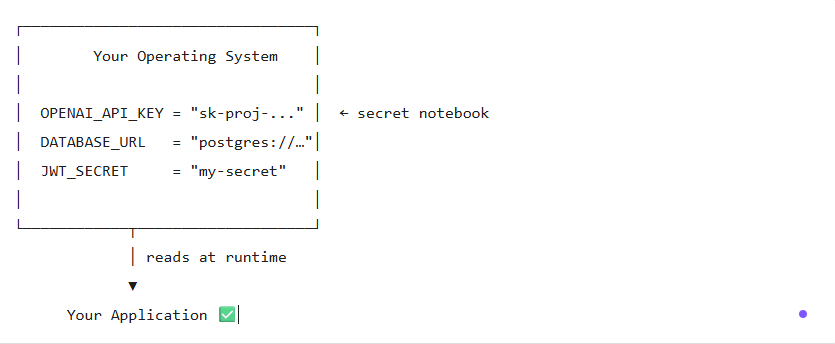
Imagine you have a secret notebook that only your computer can read.
You write your passwords, API keys, and configuration values in it.
Your apps can look up those values anytime — without you writing them directly in your code.
That notebook is your environment variables store.
How to Name Your Variables
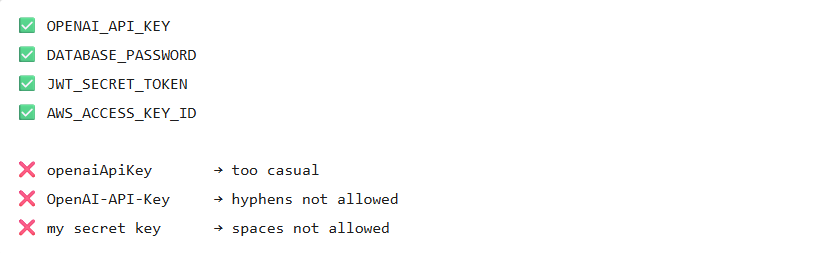
The standard convention: SCREAMING_SNAKE_CASE
- All UPPERCASE
- Words separated by underscores
_ - No spaces, no hyphens
The naming pattern: SERVICE_CATEGORY_DETAIL
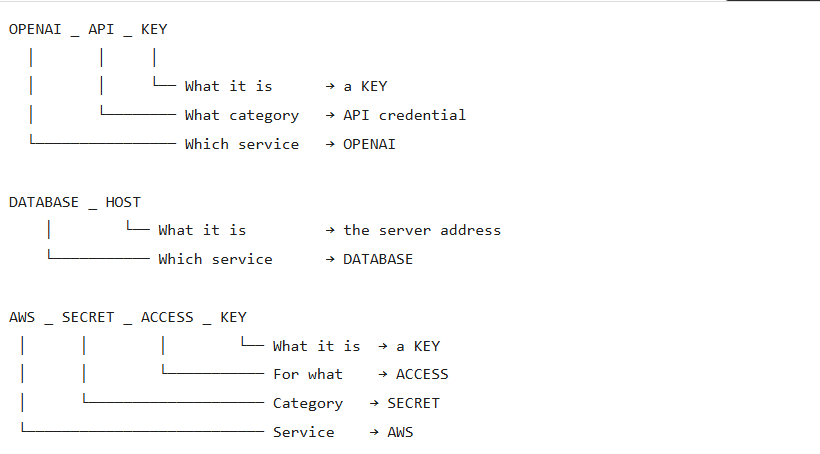
Rule of thumb: Read it left to right — it should tell a story.
OPENAI_API_KEY= “The API key for OpenAI” ?
How to Create an Environment Variable
On Windows — CMD (Permanent)
# setx = permanent, survives reboot
setx OPENAI_API_KEY "sk-proj-your-key-here"

# Success message:
# ERFOLGREICH: Angegebener Wert wurde gespeichert.
On Windows — CMD (Temporary, current session only)
# set = temporary, lost when terminal closes
set OPENAI_API_KEY=sk-proj-your-key-here
On macOS / Linux (Permanent)
# Add to your shell profile (~/.bashrc or ~/.zshrc)
echo 'export OPENAI_API_KEY="sk-proj-your-key-here"' >> ~/.zshrc

# Reload the profile
source ~/.zshrc
Important on Windows with
setx:
The variable is saved, but NOT available in the current terminal.
You must close and reopen a new terminal to use it.
How to Read / Verify a Variable
In CMD (Windows)
# Read one specific variable
echo %OPENAI_API_KEY%
# -> sk-proj-abc123...

# Search all variables starting with "OPENAI"
set OPENAI
# -> OPENAI_API_KEY=sk-proj-abc123...

# List ALL environment variables
set
In PowerShell
# Read one variable
$env:OPENAI_API_KEY
# -> sk-proj-abc123...

# List all variables
Get-ChildItem Env:

# Filter by name
Get-ChildItem Env: | Where-Object { $_.Name -like "OPENAI*" }
In Git Bash / Linux / macOS
# Read one variable
echo $OPENAI_API_KEY
# -> sk-proj-abc123...

# List all variables
env

# Filter with grep
env | grep OPENAI
How to Use a Variable in Your Code
Java (Spring Boot)
// Read directly from the system
String apiKey = System.getenv("OPENAI_API_KEY");
// Or inject via Spring @Value
@Value("${OPENAI_API_KEY}")
private String apiKey;TypeScript / JavaScript (Node.js)
// Read from environment
const apiKey = process.env.OPENAI_API_KEY;

// With a fallback default value
const apiKey = process.env.OPENAI_API_KEY ?? 'default-key';
Python
import os

api_key = os.getenv("OPENAI_API_KEY")
# or
api_key = os.environ["OPENAI_API_KEY"]
How to Use Variables in Config Files
In a .env file (most common approach)
Create a .env file at the root of your project:
# .env
OPENAI_API_KEY=sk-proj-your-key-here
DATABASE_URL=postgres://user:password@localhost:5432/mydb
JWT_SECRET=my-super-secret-token
PORT=3000
NEVER commit .env to Git!
Always add it to .gitignore:
echo ".env" >> .gitignoreIn VSCode settings.json
{
  "chatgpt.gpt3.apiKey": "${env:OPENAI_API_KEY}"
}
In a Spring Boot application.yml
openai:
  api-key: ${OPENAI_API_KEY}

spring:
  datasource:
    url: ${DATABASE_URL}
    password: ${DATABASE_PASSWORD}
In a Docker docker-compose.yml
services:
  app:
    image: my-app
    environment:
      - OPENAI_API_KEY=${OPENAI_API_KEY}
      - DATABASE_URL=${DATABASE_URL}
In a Kubernetes / OpenShift Secret
apiVersion: v1
kind: Secret
metadata:
  name: app-secrets
type: Opaque
stringData:
  OPENAI_API_KEY: "sk-proj-your-key-here"
Then reference it in your deployment:
env:
  - name: OPENAI_API_KEY
    valueFrom:
      secretKeyRef:
        name: app-secrets
        key: OPENAI_API_KEY
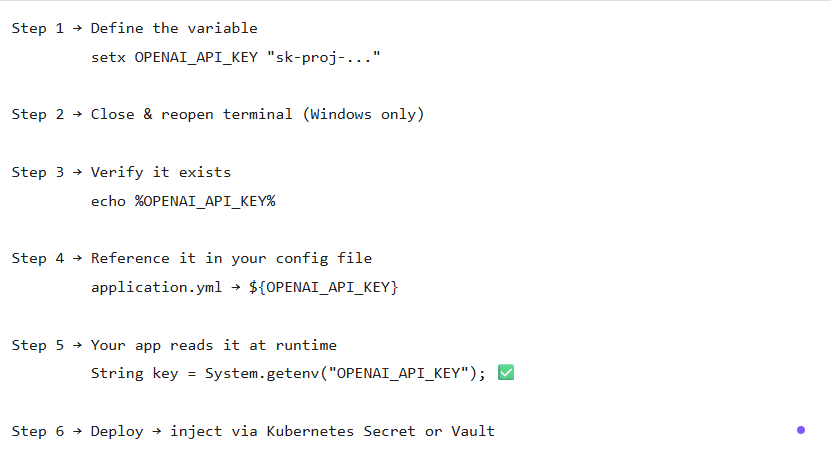
The Full Workflow — From Creation to Usage
Security Best Practices
 DO DO |  DON’T DON’T |
|---|---|
| Store secrets in env variables | Hardcode secrets in source code |
Add .env to .gitignore | Commit .env to Git |
| Use Vault or K8s Secrets in production | Use setx in production servers |
| Rotate keys regularly | Share keys in Slack / email |
| Use different keys per environment | Use the same key in dev & prod |
Real-World Examples
| Variable Name | What it stores |
|---|---|
OPENAI_API_KEY | OpenAI API secret key |
DATABASE_URL | PostgreSQL full connection string |
DATABASE_PASSWORD | Database password only |
VAULT_TOKEN | HashiCorp Vault auth token |
ARGOCD_AUTH_TOKEN | ArgoCD API token |
JWT_SECRET | JWT signing secret |
AWS_ACCESS_KEY_ID | AWS access key |
SPRING_PROFILES_ACTIVE | Active Spring Boot profile (dev/prod) |
Key Takeaways
- Environment variables = your app’s secret notebook
setx= permanent on Windows /export= permanent on Linux/Mac- Always close and reopen your terminal after
setx set OPENAIis just a search filter — the real name isOPENAI_API_KEY- Never hardcode secrets — if it’s sensitive, it belongs in an env variable