


Many developers use Angular every day, but not everyone clearly understands how the application actually boots. Whether you’re a beginner or an experienced developer, knowing what happens under the hood will make you more confident when debugging or architecting Angular apps.
Let’s break it down — step by step.
1- angular.json — The Project Blueprint
The angular.json file is the Angular CLI workspace configuration file. Think of it as the blueprint Angular reads before doing anything else.
It tells the build system where to find the key files:
| Key | Purpose |
|---|---|
index.html | The main HTML file served to the browser |
main.ts | The entry point of the application |
styles.css | Global styles applied across the app |
assets/ | Static files like images, fonts, icons |
Example snippet from angular.json:
"architect": {
    "build": {
      "options": {
        "index": "src/index.html",
        "browser": "src/main.ts",
        "styles": ["src/styles.css"],
        "assets": ["src/assets"]
      }
    }
 }
Without this file, the Angular CLI wouldn’t know where to look — it’s the very first thing consulted during the build process.
2- index.html — The Shell of our App
Once the build is configured, Angular serves index.html to the browser. This file is intentionally minimal — it acts as the shell of our application.
<!doctype html>
<html lang="en">
  <head>
    <meta charset="utf-8">
    <title>MyApp</title>
  </head>
  <body>
    <app-root></app-root>
  </body>
</html>
The key element here is <app-root></app-root>. At first glance, it looks like a custom HTML tag — and that’s exactly what it is. It’s a placeholder that Angular will later replace with the actual UI of our application.
During the build, Angular automatically injects the compiled JavaScript bundles (e.g., main.js, polyfills.js) into this file via <script> tags — we don’t have to do this manually.
3- main.ts — The Entry Point
Once the browser loads index.html and executes the injected scripts, it hits main.ts — the true entry point of our Angular application.
With the modern Standalone Component API (Angular 14+), it looks like this:
import { bootstrapApplication } from '@angular/platform-browser';
import { AppComponent } from './app/app.component';
import { appConfig } from './app/app.config';

bootstrapApplication(AppComponent, appConfig)
  .catch(err => console.error(err));
This single line tells Angular:
“Start the application using
AppComponentas the root, with the provided configuration.”
The appConfig object typically includes providers for routing, HTTP, and other services:
// app.config.ts
export const appConfig: ApplicationConfig = {
  providers: [
    provideRouter(routes),
    provideHttpClient()
  ]
};
Legacy note: In older Angular apps (before v14), the entry point used NgModule:
platformBrowserDynamic()
  .bootstrapModule(AppModule)
  .catch(err => console.error(err));
Both approaches achieve the same goal — only the API differs.
4- AppComponent — The Root Component
AppComponent is the root of the entire component tree. Every other component in our app is a child (or descendant) of this one.
// app.component.ts
import { Component } from '@angular/core';

@Component({
  selector: 'app-root',          // Matches <app-root> in index.html
  templateUrl: './app.component.html', // Defines the HTML structure
  styleUrl: './app.component.css'      // Defines component styles (Angular 17+)
})
export class AppComponent {
  title = 'my-angular-app';      // TypeScript logic lives here
}
Here’s what each key part does:
selector: 'app-root'? Tells Angular “replace<app-root>with this component’s template”templateUrl? Points to the HTML file that defines the component’s viewstyleUrl? Points to the CSS file scoped to this component onlyclass AppComponent? Contains all the TypeScript logic, properties, and methods
Quick example: If app.component.html contains <h1>Hello, {{ title }}!</h1>, the browser will render “Hello, my-angular-app!” inside <app-root>.
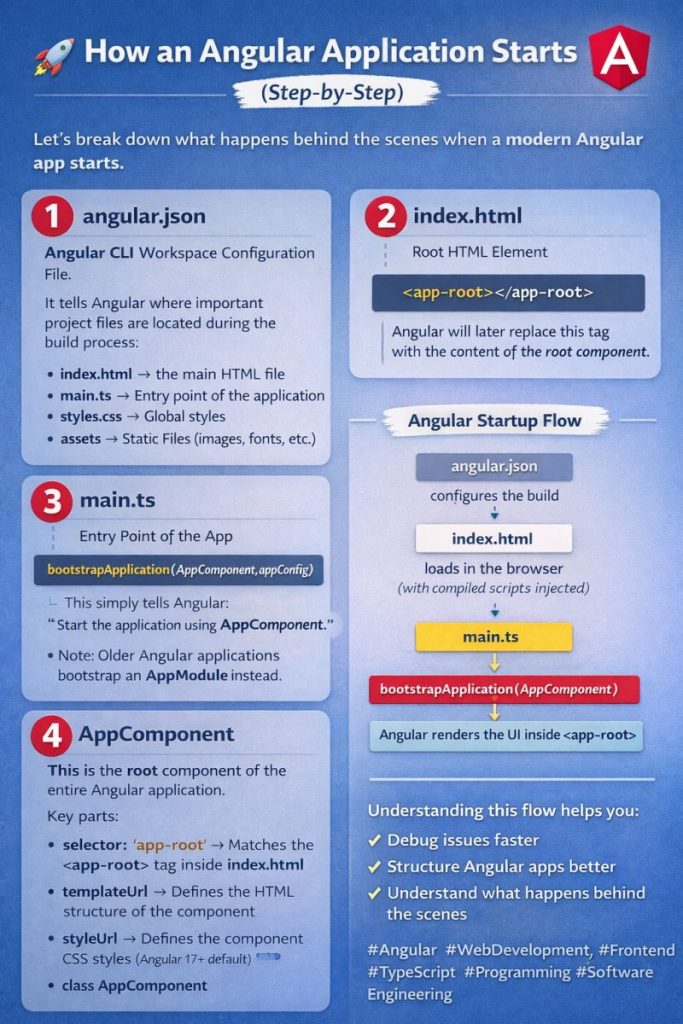
The Angular Startup Flow — Summary
Here’s the complete boot sequence visualized:
- angular.json => Configures the build (entry points, assets, styles)
- index.html => Loads in the browser with compiled scripts injected
- main.ts => Executes as the JavaScript entry point
- bootstrapApplication(AppComponent, appConfig) => Initializes the Angular framework
- Angular renders the UI inside => The placeholder is replaced with real content
- our app is live!
Why Does This Matter?
Understanding this flow gives us concrete advantages:
- Debug faster — When something breaks on startup, you know exactly which file to check first
- Structure better — Knowing the root of the tree helps you design your component hierarchy more intentionally
- Go deeper — Understanding the bootstrap process is the foundation for exploring lazy loading, SSR (Angular Universal), and custom providers