


You probably know .gitignore — but Git actually gives us 3 different levels of file exclusion. Each one has its own purpose. Let’s explore them all, simply.
Why Ignore Files?
Some files should never be pushed to your remote repository. Here are the most common ones:
- Passwords & API keys —
.env,config_secret.json - Auto-generated folders —
node_modules/,__pycache__/ - Personal notes —
notes.txt,todo.md - OS system files —
.DS_Store(Mac),Thumbs.db(Windows)
Method 1 — .gitignore (The Classic, Shared with Your Team)
Where is it? At the root of our project, right next to your code:
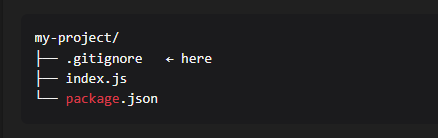
How to see it? It’s a hidden file (starts with a dot):
- Mac/Linux: run
ls -lain your terminal - Windows: enable “Show hidden files” in File Explorer
- VS Code: it shows up directly in the file explorer
How to use it? Open .gitignore and add the files or folders you want to ignore:
# Ignore the node_modules folder
node_modules/

# Ignore environment files (passwords, API keys)
.env

# Ignore all log files
*.log

# Ignore a specific file
config_secret.json
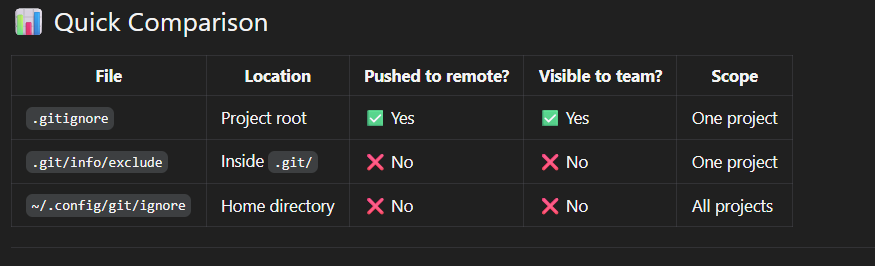
When to use it? For rules that the whole team should follow: node_modules, .env, build files, etc.
PS: This file is pushed to the remote. Everyone on your team can see exactly what you’ve excluded.
Method 2 — .git/info/exclude (Local & Secret, Per Project)
Where is it? Inside the hidden .git folder of our project:
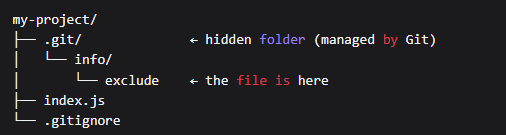
How to access it? From our terminal, at the root of our project:
# Open with VS Code
code .git/info/exclude

# Or edit with nano
nano .git/info/exclude

# Or just display it
cat .git/info/exclude
How to use it? The syntax is exactly the same as .gitignore:
# My personal notes on this project
notes.txt

# My local config file
config_local.json

# My personal test folder
my-tests/
When to use it? For personal files tied to a specific project that we don’t want to share with our team.
Real-world example: You created a notes.txt file to jot down ideas while working on a team project. You don’t want to push it, but you also don’t want to touch the shared .gitignore for something so personal ? .git/info/exclude is perfect!
Key advantage : This file is never pushed. Your team doesn’t know it exists. It’s completely invisible from the remote.
Method 3 — ~/.config/git/ignore (Global & Secret, Across All Projects)
Where is it? In your home directory, not inside any specific project:
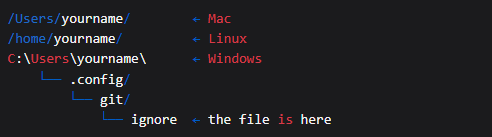
How to access it?
# Open with VS Code
code ~/.config/git/ignore

# Create the file if it doesn't exist yet
mkdir -p ~/.config/git
touch ~/.config/git/ignore
How to use it? Add files you want to ignore in every single project on your machine:
# macOS system files
.DS_Store

# Windows system files
Thumbs.db
desktop.ini

# Editor files
.vscode/
.idea/
*.swp
When to use it? For files tied to your personal environment that show up in every project.
Real-world example: On macOS, every folder automatically generates a .DS_Store file. Instead of adding it to every project’s .gitignore, add it here once — and it’s ignored everywhere, forever.
How to Check Why a File Is Being Ignored
# Ignored by .gitignore
$ git check-ignore -v .DS_Store
.gitignore:3:.DS_Store          .DS_Store

# Ignored by .git/info/exclude
$ git check-ignore -v notes.txt
.git/info/exclude:7:notes.txt   notes.txt

# Ignored by the global file
$ git check-ignore -v .DS_Store
/Users/yourname/.config/git/ignore:2:.DS_Store    .DS_Store
If the command returns no output, the file is not being ignored by anyone.
Summary
.gitignore? for rules shared with your team.git/info/exclude? for your personal files on a specific project, in total privacy~/.config/git/ignore? for your personal files across all projects, set it once and forget it